What is an internet speed test?
An internet speed test measures how fast your connection moves data: download and upload speed in megabits per second (Mbps), plus ping and jitter in milliseconds. It sends and receives test data from a nearby server and times it, so the result reflects your WiFi, router and provider together.
This one runs four checks, one after another, and shows each result live:
- Download speed (Mbps): how fast data reaches you. It decides how quickly pages load and whether video streams in HD or 4K.
- Upload speed (Mbps): how fast you send data. It matters for video calls, cloud backups and live streaming.
- Ping (ms): the round trip to the server. Lower is better for gaming and calls.
- Jitter (ms): how much ping varies. Steady, low jitter keeps calls smooth.
Several parallel streams fill the connection the way a real download does, so the figure reflects your line rather than a single slow request. The test data comes from Cloudflare’s speed test endpoints, answered by its data center nearest to you. It works as a download speed test, upload speed test, ping test and jitter test in one, and as a broadband speed test, a bandwidth test and a quick internet speed checker.
What speed do you need?
Most activities need far less than people expect: the FCC puts 4K streaming, the most demanding one, at 25 Mbps download, and HD video at 5–8 Mbps. Add these figures up for everything your household does at the same time.
| Activity | FCC minimum download | Also important |
|---|---|---|
| Browsing, email, social media | 1 Mbps | — |
| HD video streaming | 5–8 Mbps | Netflix asks for 5 Mbps for 1080p |
| 4K video streaming | 25 Mbps | Netflix asks for 15 Mbps for 4K |
| HD video conferencing | 6 Mbps | Steady upload and low jitter |
| Online multiplayer gaming | 4 Mbps | Ping under 50 ms |
| File downloading | 10 Mbps | — |
| Working from home | 5–25 Mbps | Upload matters for calls and cloud files |
Sources: the FCC’s Broadband Speed Guide (one activity at a time) and Netflix’s internet speed recommendations. The ping figure is a common gaming rule of thumb, not an FCC number.
WiFi speed test: is it the WiFi or the line?
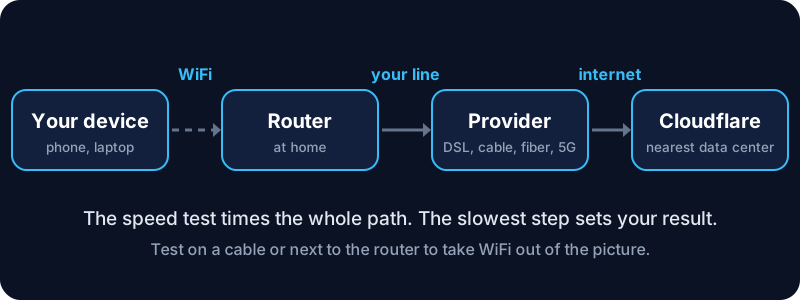
A WiFi speed test measures the whole path: your device, the wireless signal, the router and the line from your provider. To find where speed is lost:
- Test next to the router, then in the room where things feel slow. A big drop points to the WiFi signal, not the line.
- Test on a cable if your laptop has an Ethernet port. That result is the true speed of your connection.
- Try the 5 GHz band (or 6 GHz on newer routers). It is much faster than 2.4 GHz at short range.
- Restart the router and test again. It clears a surprising number of slowdowns.
DSL, cable, fiber and 5G speed tests: what speed is normal?
The same net speed test works on any kind of connection and any provider. What counts as a normal result depends on the technology:
| Connection | Typical download | Typical upload | Notes |
|---|---|---|---|
| DSL / ADSL / VDSL | 5–100 Mbps | 1–20 Mbps | Slower the farther you are from the exchange |
| Cable | 100–1,000 Mbps | 10–50 Mbps | Evenings can be slower on busy networks |
| Fiber (FTTH) | 300–2,000+ Mbps | Often equal to download | Lowest ping and jitter |
| Mobile 4G | 10–60 Mbps | 5–20 Mbps | Varies with signal and crowds |
| Mobile 5G | 100–1,000 Mbps | 10–100 Mbps | Best near a mid-band or mmWave mast |
| Satellite | 25–250 Mbps | 5–30 Mbps | High ping on older geostationary services |
A DSL speed test often shows a much lower upload than download: that is how DSL is built, not a fault. A fiber speed test often shows upload almost as fast as download, while a cable speed test usually shows a much lower upload. For a mobile speed test or 5G speed test, switch off WiFi first so the phone uses the mobile network.
How do you get an accurate speed test result?
- Pause other downloads and streaming on the same connection.
- Test close to the router, or on a cable, to separate Wi-Fi problems from the line itself.
- Test at different times: evenings are often slower when the whole neighborhood is online.
- Turn off a VPN, which adds distance and overhead, unless you want to measure the VPN.
- Close other browser tabs, especially video and cloud sync, before you press Start.
- Let the page finish loading before you press Start, so nothing else on the page is still downloading while you test.
Speeds are in megabits per second; file sizes are in megabytes, eight times larger. A 100 Mbps connection downloads about 12.5 MB each second. Convert any figure with the bytes and bits converter.
How does it compare with the Ookla speed test?
Many people know the Ookla speed test (Speedtest.net). It and this test measure the same four numbers, but they use different server networks, so results can differ by a few percent:
| Feature | This speed test | Ookla Speedtest |
|---|---|---|
| Servers | Cloudflare’s nearest data center | Choice of thousands of hosted servers |
| Measures | Download, upload, ping, jitter | Download, upload, ping, jitter |
| Needs an app | No, runs in the browser | Browser or app |
| Signup | None | None for basic tests |
| Extra info | Your IP, network and test location | Provider and server name |
If one speed test shows a slow result, run another to confirm before contacting your provider. Two low results from different networks point to your connection, not the test.
Speed test slow? What to try next
- Compare with your plan. Getting 80–90% of the advertised speed on a cable is normal. Run the internet speed test two or three times before you judge.
- Check for many devices sharing the connection: phones updating apps, TVs streaming, cloud backups.
- Update the router firmware, or replace a router older than about five years.
- Record a few results at different times. A screenshot of repeated slow tests is the best evidence for your provider.
- High ping but good speed? Check whether the server you use is far away; see where an address is with the IP WHOIS lookup.