Binary translator: binary code to English
This binary to text converter works as a binary decoder and an encoder at once. Paste a message written in 0s and 1s into the Binary box and the English text appears on the left; type in the Text box and you get text to binary on the right. It reads binary with or without spaces, so a long unbroken string like 0100100001101001 works as well as 01001000 01101001.
Because it uses UTF-8, the same encoding web pages use, it is also a binary to ASCII converter for plain English: every ASCII letter, digit and punctuation mark is one byte, exactly as in the table below.
How to read binary code by hand
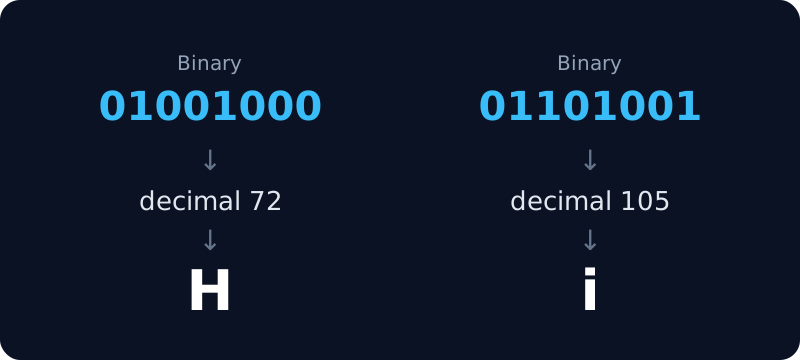
- Split the binary into groups of 8 bits. Each group is one byte, for example
01001000. - Turn each group into a number. The 8 positions are worth 128, 64, 32, 16, 8, 4, 2 and 1; add up the positions that hold a 1. In
01001000that is 64 + 8 = 72. - Look the number up. 72 is the capital letter H. The binary alphabet below lists every letter and digit, so you can skip the arithmetic.
This is how to read binary for any English message. Characters outside English, such as é or emoji, take two to four bytes in UTF-8; the converter above handles those for you.
Binary alphabet: A–Z, a–z and 0–9 in binary
The letters in binary, as computers store them. Capital and small letters differ by a single bit (the third from the left), which is why A is 01000001 and a is 01100001.
| Capital | Binary | Small | Binary |
|---|---|---|---|
| A | 01000001 | a | 01100001 |
| B | 01000010 | b | 01100010 |
| C | 01000011 | c | 01100011 |
| D | 01000100 | d | 01100100 |
| E | 01000101 | e | 01100101 |
| F | 01000110 | f | 01100110 |
| G | 01000111 | g | 01100111 |
| H | 01001000 | h | 01101000 |
| I | 01001001 | i | 01101001 |
| J | 01001010 | j | 01101010 |
| K | 01001011 | k | 01101011 |
| L | 01001100 | l | 01101100 |
| M | 01001101 | m | 01101101 |
| N | 01001110 | n | 01101110 |
| O | 01001111 | o | 01101111 |
| P | 01010000 | p | 01110000 |
| Q | 01010001 | q | 01110001 |
| R | 01010010 | r | 01110010 |
| S | 01010011 | s | 01110011 |
| T | 01010100 | t | 01110100 |
| U | 01010101 | u | 01110101 |
| V | 01010110 | v | 01110110 |
| W | 01010111 | w | 01110111 |
| X | 01011000 | x | 01111000 |
| Y | 01011001 | y | 01111001 |
| Z | 01011010 | z | 01111010 |
| Digit | Binary | Character | Binary |
|---|---|---|---|
| 0 | 00110000 | 5 | 00110101 |
| 1 | 00110001 | 6 | 00110110 |
| 2 | 00110010 | 7 | 00110111 |
| 3 | 00110011 | 8 | 00111000 |
| 4 | 00110100 | 9 | 00111001 |
| space | 00100000 | ! | 00100001 |
| . | 00101110 | ? | 00111111 |
Common words and phrases in binary
Each phrase written as 8-bit bytes, one byte per character, with spaces as 00100000. Capital letters matter: Love and love start with different bytes.
| Text | Binary |
|---|---|
| Hi | 01001000 01101001 |
| Hello | 01001000 01100101 01101100 01101100 01101111 |
| Hello World | 01001000 01100101 01101100 01101100 01101111 00100000 01010111 01101111 01110010 01101100 01100100 |
| Love | 01001100 01101111 01110110 01100101 |
| I love you | 01001001 00100000 01101100 01101111 01110110 01100101 00100000 01111001 01101111 01110101 |
| Yes | 01011001 01100101 01110011 |
| No | 01001110 01101111 |
| Help | 01001000 01100101 01101100 01110000 |
| SOS | 01010011 01001111 01010011 |
| Thank you | 01010100 01101000 01100001 01101110 01101011 00100000 01111001 01101111 01110101 |
How binary text works
Computers store text as numbers. Each character becomes one or more bytes (UTF-8), and each byte is eight binary digits. Reading binary back is the same steps in reverse: group the bits in eights, turn each group into a number, and look up the character.
| Character | Decimal | Hex | Binary |
|---|---|---|---|
| A | 65 | 41 | 01000001 |
| a | 97 | 61 | 01100001 |
| 0 | 48 | 30 | 00110000 |
| space | 32 | 20 | 00100000 |
| é | 195 169 | c3 a9 | 11000011 10101001 |
Binary vs ASCII vs UTF-8
- Binary is just the number system: every value written with 0s and 1s.
- ASCII is a 1960s table that gives 128 characters (English letters, digits, punctuation) the numbers 0 to 127.
- UTF-8 is today’s standard. It keeps the ASCII numbers for those 128 characters, so English text is identical in both, and adds every other script and emoji using two to four bytes.
UTF-8 is defined in RFC 3629, and the characters it can encode are listed by the Unicode Consortium. This converter follows that standard, so its output matches what browsers and programming languages produce.
Text to binary for names and messages
To write your name in binary, type it into the Text box and copy the result. Each letter becomes eight digits, so “Sam” is 01010011 01100001 01101101. It is a popular idea for bracelets, tattoos, cards and puzzles; check capital and small letters, because they give different binary.
For other ways to encode text, switch the tool to hex or Base64, or create a checksum of it with the MD5 and SHA hash generator.
Accepted input
- Binary: 8-bit groups separated by spaces, or one long run of 0s and 1s whose length is a multiple of 8.
- Hex: two digits per byte, with or without spaces or a
0xprefix. - Decimal: byte values from 0 to 255, separated by spaces or commas.
- Base64: standard or URL-safe (with - and _).
To see how big data is in other units, use the bytes and bits converter.